Key Takeaways
- Cognitive overload is a measurable performance state, not just a feeling of tiredness.
- The most valuable signal for overload is a sustained drop in response velocity (speed on correct answers).
- An adaptive AI’s primary role in study sessions should be to modulate difficulty in real-time based on this signal.
- Strategic, non-verbal micro-breaks triggered by overload signals are more effective than fixed, arbitrary timers.
- Personalizing your cognitive load threshold requires correlating your subjective state with objective performance data over time.
Introduction
You’ve optimized your schedule, sourced the best materials, and even started using AI to generate practice questions. Yet, after 45 minutes, your mind feels foggy, your reading slows to a crawl, and what was clear an hour ago now seems impenetrable. This isn’t a lack of willpower or a flawed study plan. It’s cognitive overload, a fundamental constraint of human learning that most advice ignores. This article moves beyond generic ‘take breaks’ suggestions. We’ll build a practical framework for using AI not just as a content generator, but as an active regulator of your mental effort, ensuring each study minute is metabolized into lasting retention without draining your cognitive resources.
Why Cognitive Load Management is the Missing Piece in Modern Study Techniques
Cognitive load theory, pioneered by John Sweller, distinguishes between intrinsic load (the inherent complexity of the material), extraneous load (poorly designed information presentation), and germane load (the mental effort devoted to processing and schema construction). The critical insight for self-directed learners is that your working memory has a fixed, limited capacity. Exceeding it doesn’t mean you’ll ‘try harder’, it means your ability to process any information degrades. Traditional study methods and even many AI tools focus exclusively on intrinsic load (covering the material) while often increasing extraneous load (disorganized quizzes, irrelevant details). They neglect germane load optimization. The result is a learner who is busy, but not effectively building durable knowledge. The goal shifts from ‘covering content’ to ‘managing the mental space required to encode that content.’
Recognizing the Early Symptoms of Cognitive Overload in Self-Directed Study
Overload isn’t just a headache. It manifests in subtle, performance-based signals long before you feel ‘done.’ Acknowledge these early symptoms to intervene proactively:
- Performance Velocity Decay: Your reading speed or question-answering rate drops by 30% or more within a single session, not due to material difficulty but to mental fatigue.
- Increased Rereading: You find yourself reading the same paragraph or question stem multiple times without comprehension, a classic sign of working memory saturation.
- Guessing Over Reasoning: You begin selecting answers based on pattern recognition or ‘feeling’ rather than reconstructing the underlying principle.
- Task-Switching Urge: You feel an almost physical pull to check your phone or switch to a different subject, which is your brain seeking lower-load stimulation.
- Emotional Frustration: A rising sense of irritation with the material itself, rather than a strategic recognition that the current mental state is the problem.
Normalize these signals. They are not failures; they are data points indicating your current cognitive load exceeds your available resources.
Beyond Content Generation: How AI Can Act as a Real-Time Cognitive Load Regulator
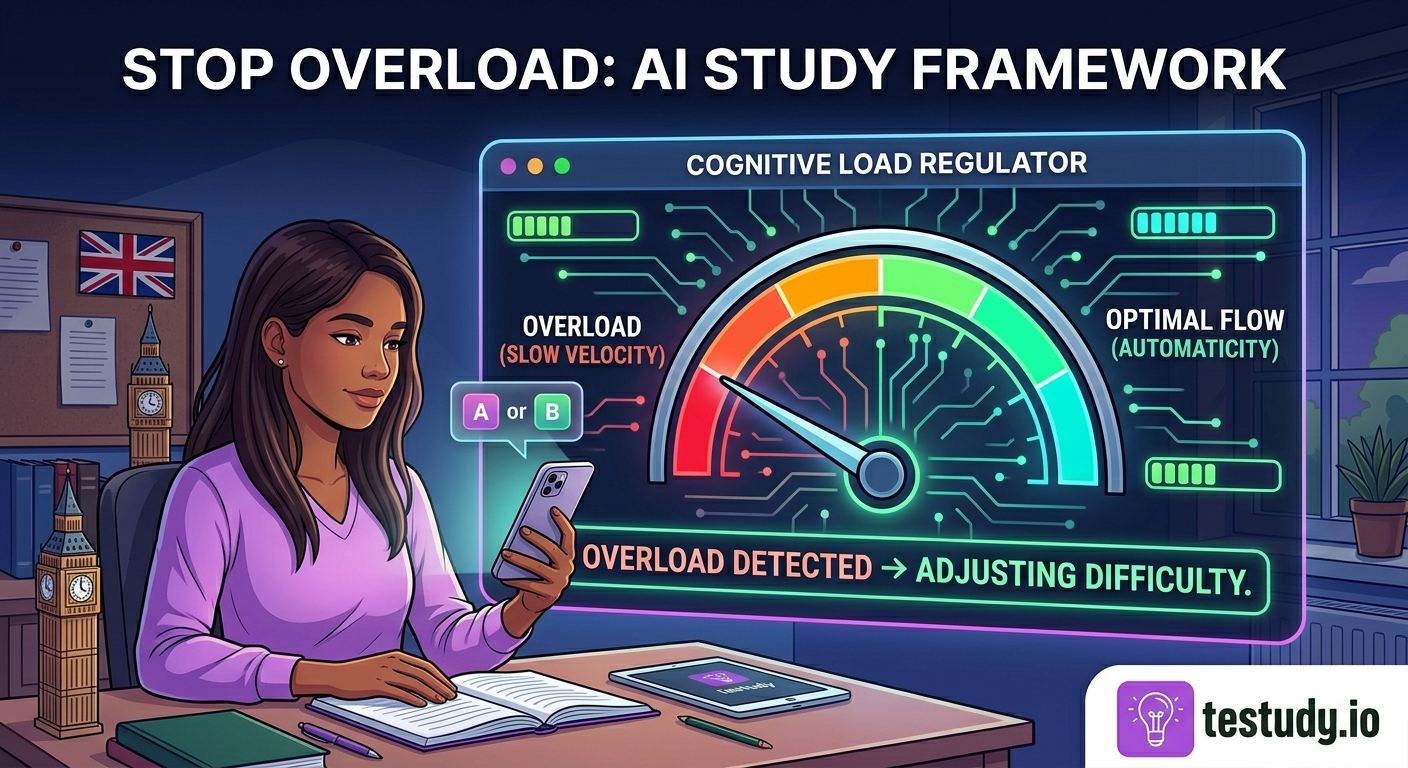
The standard AI study tool takes your input and outputs a static quiz. An adaptive cognitive load regulator does something different: it closes the loop. It treats your study session as a dynamic system where your real-time performance is the primary input for adjusting the system’s output (the next question, the next topic). This shifts the AI’s role from ‘library’ to ‘coach.’ The coach doesn’t just hand you more books when you’re struggling; they assess your current state and change the task. For Testudy’s engine, this means the algorithm isn’t just tracking ‘correct/incorrect.’ It’s analyzing the pattern of your responses, speed, consistency, error type, to infer your current cognitive bandwidth. If it detects velocity decay paired with errors on previously mastered material, it interprets this as an overload signal and will automatically adjust subsequent questions to be simpler, shorter, or from a different modality (e.g., switching from complex multiple-choice to a direct recall prompt) to reduce extraneous load and allow working memory to recover.
Inside the Adaptive Engine: Dynamically Adjusting Difficulty Based on Performance Velocity
Let’s demystify ‘performance velocity.’ It’s the average time taken to produce a correct response, measured per question or per small batch. This metric is crucial because it correlates strongly with automaticity, the stage of learning where recall is effortless and consumes minimal working memory.
How the adjustment works in practice:
- Scenario A (Optimal Load): You answer medium-difficulty questions in 8-12 seconds with 90%+ accuracy. The engine maintains current difficulty, trusting you’re in the ‘desirable difficulty’ zone where germane load is high but manageable.
- Scenario B (Emerging Overload): Your velocity on similar questions drops to 18-25 seconds, and accuracy falls to 70%. The engine flags this as a potential overload state. The next question is algorithmically selected to be one difficulty level easier, or it reintroduces a concept from 2-3 days ago (a known, mastered item) to provide a ‘cognitive palate cleanser’ and rebuild confidence/automaticity.
- Scenario C (Recovery): After 2-3 easier questions, your velocity on the original medium-difficulty format rebounds to 10 seconds. The engine gradually reintroduces medium-hard items.
This isn’t arbitrary. It’s applying the principle of ‘interleaving’ and ‘spacing’ in real-time based on your individual cognitive state, not a pre-set schedule.
Integrating Science-Backed Micro-Breaks Within AI-Planned Session Structures
Breaks are non-negotiable for cognitive recovery, but their timing is critical. The most effective break is one taken just before complete overload, not after. How does the AI inform this?
- Break Trigger: The engine’s overload detection (from Section 3) can be configured to automatically pause the session and suggest a 90-120 second micro-break. This break should involve zero verbal/linguistic processing (no reading, no summarizing). Physical movement (standing, stretching) or a mindfulness breath is ideal.
- Session Architecture: Instead of a 60-minute block, the AI structures a session into 15-18 minute ‘sprints’ separated by these micro-breaks. The length of the sprint is dynamically adjusted based on your historical load thresholds—some learners naturally have longer high-load windows.
- The Recovery Mechanism: During the break, the brain consolidates the neural patterns formed during the sprint. Returning to a slightly easier question post-break leverages this consolidation, strengthening the memory trace without immediately re-overloading the system.
Do not use the break to quickly check messages or news. This introduces a new, high-extraneous-load task and prevents true recovery.
Personalizing Your Cognitive Load Threshold: Moving Beyond Generic Settings
The AI’s default settings are a population average. Your personal optimal threshold may be higher or lower based on expertise, sleep, nutrition, and even time of day. Personalization happens over weeks by observing your own data.
Your Actionable Review: At the end of each week, review your session summaries. Look for:
- Time-of-Day Patterns: Are your velocity and accuracy consistently 20% lower in the afternoon? This is a data point for scheduling your most demanding topics for high-focus periods.
- Session Length vs. Decline: At what exact minute mark does your velocity begin its steepest decline? This is your personal sprint length. Advocate for this by adjusting your AI-planned session goals accordingly.
- Error Analysis: Are your overload-induced errors mostly on ‘application’ questions or ‘definition’ questions? This helps diagnose whether your overload is impeding higher-order thinking or basic recall.
You provide this feedback loop by consciously noting your subjective state during a session (e.g., ‘felt sharp’ vs. ‘fuzzy at minute 40’) and correlating it with the engine’s logged metrics. Over time, you can manually fine-tune the AI’s sensitivity or simply let the adaptive engine learn from your prolonged performance patterns.
Conclusion: Building a Sustainable Study System, Not Just a Content Pipeline
The promise of AI in education has been too often reduced to efficiency, producing more flashcards in less time. The deeper opportunity is efficacy: ensuring the time you spend actually changes your brain. Managing cognitive load is the linchpin of this. By viewing your study session as a closed-loop system where your real-time performance dictates the next challenge, you respect the biological limits of your working memory. You move from a brute-force approach (more hours, more questions) to a surgical one (precise effort, optimal recovery). The goal is not to study until you’re exhausted. The goal is to study in a way that maximizes retention per unit of mental energy expended, making learning sustainable, even enjoyable, over months and years. Start by observing your own overload signals, they are the most important feedback you have.
Conclusion
True mastery isn’t built in moments of heroic struggle, but in the disciplined management of mental energy. The framework above recognizing symptoms, leveraging an adaptive engine to regulate difficulty, integrating precise breaks, and personalizing thresholds, transforms AI from a passive content source into an active partner in cognitive stewardship. Your next step is not to find a harder quiz, but to analyze your last session’s velocity data. Where did the decline begin? That number is your new starting point for a smarter, more sustainable study system.
Food for Thought
Think of your last study session. At what point did you first notice your reading or thinking slowing down? Was it tied to a specific topic or question type?
When you encounter a question you know but answer slowly, do you interpret that as ‘I’m tired’ or ‘this concept isn’t solid’? How might reframing it as a cognitive load signal change your next action?
If you had a coach watching your study session who could only say one thing to you when you started to struggle, what would you want that instruction to be? (e.g., ‘Slow down,’ ‘Switch topics,’ ‘Take a break now.’)
Do you currently have a way to measure your study ‘productivity’ beyond ‘number of pages covered’ or ‘questions answered’? What would a metric that valued ‘mental efficiency’ look like?
Frequently Asked Questions
How can an AI possibly know I’m mentally overloaded? Isn’t that a subjective feeling?
It doesn’t measure your feeling; it infers state from objective performance proxies. The strongest signal is a sharp, unexplained drop in your response speed (velocity) on material you previously handled competently, often coupled with a rise in specific error types. This pattern correlates strongly with working memory saturation in lab studies. The AI treats this pattern as a reliable overload indicator.
If the AI keeps making questions easier when I’m tired, won’t I just learn less challenging material?
The goal during an overload state is not to learn new, hard material, but to consolidate what you’ve recently studied and recover cognitive resources. The ‘easier’ questions often serve as retrieval practice for recently introduced concepts, strengthening those neural pathways. Once your velocity recovers, the AI will seamlessly reintroduce higher difficulty. It’s a strategic retreat to enable future advance.
I already use spaced repetition. Does managing cognitive load during a session really make a difference?
Yes, because spaced repetition optimizes when you review, but not how you review in that moment. You could have a perfectly spaced review session but be in a state of high cognitive load, leading to shallow processing, frustration, and poor encoding during that session. Cognitive load management ensures the quality of each individual review event is maximized, making the spaced repetition intervals more effective.
What if I disagree with the AI’s assessment? I might be slow because the question is poorly worded, not because I’m overloaded.
This is a valid concern and why the system uses patterns, not single data points. One slow answer is noise. A trend of slowing across 3-4 consecutive questions, especially on varied topics, is signal. The system is also designed to be conservative—it errs on the side of maintaining difficulty unless a clear pattern emerges. Your subjective critique of question quality is important feedback for the platform’s content team, separate from the real-time load-regulation algorithm.
Can I use this framework without Testudy’s specific AI?
The principles are universal. You can self-regulate by manually tracking your velocity on a stopwatch for a batch of 10 questions. If your average time jumps significantly, you’ve detected overload. Your ‘AI adjustment’ is then a conscious decision to switch to a simpler topic or easier question type for a few minutes. The framework provides the diagnostic criteria; the tool automates the response.
How long does it take for the AI to ‘learn’ my personal cognitive load threshold?
Initial calibration takes approximately 5-10 focused sessions (about 5-8 hours of active study) where you engage consistently without external major disruptions (e.g., poor sleep). The algorithm builds a baseline of your typical velocity ranges and variability. True personalization is an ongoing process, as your thresholds can shift with improved expertise, health, or even seasonally. The system continuously updates its model.