Key Takeaways
- Mobile-first learning is about designing for fragmented context, not small screens.
- True context-awareness uses time, location category, and notification state to adapt quiz type and session structure.
- The interface must be touch-optimized to reduce cognitive and physical friction in brief sessions.
- Spaced repetition algorithms must be flexible enough to account for unpredictable session lengths and intervals.
- An offline-first architecture is essential for seamless cross-device continuity of context and progress.
- Battery and data optimization are achieved through local computation, intelligent pre-fetching, and compressed payloads—not by reducing AI sophistication.
Introduction
You have five minutes. You’re on a bus, a train, in a cafe line. You pull out your phone to study. What happens? If your learning tool is simply a ‘responsive’ website, you’re likely met with a shrunken version of a desktop quiz, tiny buttons, dense paragraphs, a design that demands focus you don’t have. The result is frustration, abandonment, and the reinforcing belief that mobile study is ‘second-best.’ This is a fundamental misunderstanding. Mobile-first learning isn’t about making desktop content fit a smaller screen. It’s about designing for the reality of mobile: fragmented time, shifting locations, constant interruptions, and finite battery. The next generation of AI-powered study tools doesn’t just respond to screen size; it understands your context, the minute you have, the place you’re in, the fact you just dismissed a notification and adapts the learning experience in real-time. This guide moves beyond responsive design to explore the architecture and UX patterns that make true contextual mobile learning possible. We’ll examine how AI can turn those brief, intermittent moments, often dismissed as ‘dead time’, into potent, efficient study sessions that respect your device’s limits and your cognitive bandwidth.
The Problem with ‘Responsive’ Mobile Learning
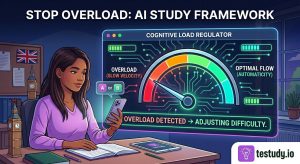
Responsive web design was a monumental step forward, ensuring content was readable on any device. In education, it became the default ‘mobile solution’: take a desktop quiz, flow the text to the screen width, and call it done. This approach fails because it confuses visibility with usability. A 10-question multiple-choice quiz with 5 options each may be visible on a phone, but interacting with it requires 50 precise taps, constant scrolling, and sustained attention, all things antithetical to a 3-minute bus ride. The core problem is a mismatch between the cognitive load of the interface and the cognitive capacity of the moment. A learner on mobile is often in a state of ‘continuous partial attention.’ The tool must do the work of reducing friction, not just presenting the same work in a smaller box. This requires rethinking the fundamental unit of study: from ‘a quiz’ to ‘a contextually-appropriate learning interaction.’
What ‘Context-Aware’ Actually Means: Time, Location, and Notification State
Context-aware learning uses three primary, low-friction signals to adapt the experience:
- Time (Predicted Session Length): The AI learns your typical engagement patterns. Did you usually complete 2 questions in the 4 minutes between train stops? It will present a ‘micro-quiz’ of 2-3 single-choice or true/false items, optimized for a 3-5 minute window. If you open the app at 10 PM on a couch, it may offer a longer, 10-question session with short-answer challenges, anticipating a 15-20 minute focus period.
- Location (Environmental Cue): Your location is a proxy for available mental resources and potential interruptions. ‘Home, evening’ might trigger deeper, application-based questions. ‘Transit, weekday morning’ suggests a high-interruption environment, so the AI favors low-stakes, rapid-fire recall over complex problem-solving. It’s not about GPS tracking; it’s about pattern matching to known user states.
- Notification State (Device Interruption Level): If the system detects you just dismissed several notifications, it infers a high-interruption context. It may delay a new session prompt or offer a single, ultra-simple ‘warm-up’ question to re-engage without pressure. Conversely, if your phone is in Do Not Disturb mode, it might push a more demanding challenge, knowing the environment is controlled.
These signals are fused into a ‘context score’ that dynamically adjusts not just when you study, but what you study and how.
Touch-Optimized Active Recall: Reducing Friction in Micro-Moments
Active recall, retrieving information from memory, is the most powerful study technique. On mobile, the interface for recall must be frictionless. This means:
- Target Size: Tappable areas (answer buttons) must be at least 44×44 pixels with generous spacing to prevent mis-taps during motion.
- Minimalist Presentation: One question per screen. No scrolling. The answer options should be vertically stacked large buttons, not dense text lists.
- Gesture Integration: Simple swipe-left/right for ‘know/don’t know’ in a rapid review mode, reducing the need for precise tapping.
- Immediate Feedback: Correct/incorrect indication must be instantaneous and clear (color + icon), with a single tap to advance. No intermediate ‘next’ screens.
The goal is to reduce the ‘cognitive friction’ between the thought ‘I need to study’ and the action ‘I am studying.’ Every extra millisecond of interface confusion steals from the limited attention budget of a mobile moment.
Adaptive Spaced Repetition for Intermittent Sessions
Standard spaced repetition systems (SRS) like Anki assume regular, user-initiated review sessions. Mobile context breaks this assumption. The AI must answer: ‘Given this 4-minute window now, and the fact the user had a 12-minute session yesterday, what is the optimal type of challenge and spacing for this specific item?’
- Session-Length Prediction: Based on the context score (time/location/notification), the system predicts the probable session length. For a predicted 4-minute session, it may present only the most ‘due’ items using a single, fast question type (e.g., recognition-based multiple choice). For a predicted 20-minute session, it can introduce newer items or harder formats (e.g., cloze deletion, short answer).
- Dynamic Interval Adjustment: The classic SRS interval (again in 1 day, 3 days) is a guideline. If a user consistently performs well on Item X only during 5-minute transit sessions, the algorithm may slightly extend the next interval, recognizing that the ‘transit context’ provides a specific retrieval cue. Conversely, if performance drops in the evening, it may shorten the interval for evening-scheduled reviews.
This is not abandoning the science of spaced repetition; it’s making the scheduling algorithm sensitive to the contextual variables that influence recall probability in real-world mobile use.
Offline-First Architecture: Seamless Continuation Across Devices
For context-aware learning to work, the AI’s ‘understanding’ of the user’s state must persist and sync seamlessly. An offline-first architecture is non-negotiable. This means:
- Local Database: All user progress, context logs (session length, location type, time of day), and the adaptive scheduling model weights are stored locally on the device.
- Context Logging: When a session starts, the app logs the context signals (time, coarse location, notification state) with the study event. This happens entirely offline.
- Sync on Connect: When the device reconnects to the internet, these context logs and progress updates are synced to the cloud. The cloud aggregates data across all devices to refine the global user model, then pushes updated model parameters back to all devices.
The user experience is seamless: start on phone during commute, finish on tablet at home. The AI on the tablet knows about the phone’s context-logged session and adjusts accordingly. There is no ‘syncing wait’ or manual export/import. This architecture is the backbone that makes cross-device context awareness possible.
Battery and Data Usage Optimization Without Sacrificing Intelligence
Mobile learning cannot be a battery hog. Optimization strategies must be baked in:
- Local Computation: The context scoring and session-length prediction model should be lightweight enough to run on-device. Only aggregated, anonymized model updates (not raw session data) need to be sent to the cloud periodically.
- Intelligent Pre-fetching: Using predicted context (e.g., ‘user usually studies at 7 PM at home on WiFi’), the app can pre-download the next day’s content package overnight on WiFi. This uses zero mobile data and ensures instant load at study time.
- Compressed Content Payloads: Quiz content (questions, answers) should be stored and transmitted in highly compressed formats. Rich media (images, audio) should be lazy-loaded only when needed and cached.
- Context-Aware Sync Frequency: Sync operations (uploading logs, downloading updates) should be batched and scheduled during known charging/WiFi periods, not triggered on every session end.
The trade-off is clear: more frequent, high-fidelity context logging could improve model accuracy but drains battery. The optimal system finds the minimum viable data points (e.g., session duration bucket, location category) that provide 80% of the adaptive benefit with 20% of the resource cost.
Putting It All Together: A Typical Context-Aware Study Flow
Let’s trace ‘Alex,’ a medical student:
- Monday, 8:15 AM (Transit): Alex opens the app on the train. Context: short time (5-7 min), high-motion location, phone just received 3 notifications. The app predicts a ‘short, high-interruption’ session. It presents 3 single-choice questions from the ‘Cardiovascular’ deck, with large tappable buttons. Alex answers, gets instant feedback, and puts the phone away at the station. The session is logged as:
{duration: 4min, location: transit, notification_state: high, item_ids: [123,456,789]}. - Monday, 9:00 PM (Home, WiFi, Charging): Alex opens the app again. Context: long time available (20+ min), low-interruption home environment, device charging. The app predicts a ‘deep study’ session. It presents a 10-question set mixing multiple-choice and 2 short-answer questions on the same Cardiovascular topic, but on related sub-topics not yet reviewed. The spacing algorithm, noting Alex’s strong performance on the morning’s transit items, schedules those items for a 3-day interval, while the new short-answer items are scheduled for tomorrow.
- Cross-Device Continuation: Alex starts the evening session on a laptop. The laptop’s local model has synced the morning’s context log and the updated schedule. It knows to present the same ‘deep study’ set. If Alex stops after 5 questions, that partial session and its context are logged locally and synced later. The phone, when opened next, will not re-present those 5 completed questions.
This flow demonstrates the system’s responsiveness to real-world context, not just a static study plan.
Conclusion: The Future of Learning Is Ambient and Adaptive
The promise of mobile learning has too often been reduced to ‘access anywhere.’ The next frontier is ‘adaptation everywhere.’ True mobile-first learning recognizes that the phone is not a pocket-sized computer but a sensor-rich portal into the learner’s life. The AI’s job is to interpret the signals of that life, the minutes, the movements, the interruptions and shape the learning experience to fit, not fight, them. This requires moving beyond responsive design to context-aware design. It demands an offline-first architecture for continuity, touch-optimized interfaces for frictionless recall, and resource-smart algorithms that respect battery and data. The goal is not to force more study time, but to make the existing fragmented time vastly more effective. When the tool understands that a 4-minute window on a bus is different from a 20-minute evening session, it can deliver the right challenge at the right moment. That is how we finally eliminate busywork and make every swipe, every tap, count toward genuine mastery.
Conclusion
The shift to mobile-first, context-aware learning represents a maturation of educational technology. It moves the focus from content delivery to experience orchestration. For the learner, this means the anxiety of ‘I don’t have enough time to study properly’ can dissipate, replaced by the confidence that the brief moments they do have are being intelligently leveraged. The technology handles the complexity of adaptation, scheduling, and optimization. The learner’s role remains what it should always be: to engage, to recall, to think. The tool simply ensures that the opportunity to do so is always present, perfectly tailored to the moment at hand. This is not a futuristic vision; it is the necessary design response to how people actually live and learn in the 21st century.
Food for Thought
Think about your last three mobile study attempts. What was the actual context? (Time of day? Location? How many interruptions?) How did the tool you used respond or fail to respond—to that context?
Consider your own attention span on mobile. Do you realistically have 2 minutes, 5 minutes, or 15 minutes for a focused session? How would your ideal study tool look different for each of those durations?
Do you feel more anxious when a learning app demands a long session on your phone, or when it gives you a trivial task that feels like a waste of time? Where is the sweet spot for you?
If your study tool could perfectly predict the ‘right’ type of quiz for your next 5-minute window, what would that quiz look like? What would it not include?
Frequently Asked Questions
How does context-aware scheduling differ from regular spaced repetition?
Regular spaced repetition (SRS) uses a fixed algorithm based solely on your historical performance on an item (e.g., ‘if you got it right, interval x3’). Context-aware scheduling adds a layer: it adjusts the presentation of that item (quiz type, session length) and can slightly modulate the next due date based on the context of the current session. For example, if you consistently answer a difficult concept correctly only during 10-minute focused evening sessions, the system may schedule it for a longer evening session and avoid presenting it during short transit bursts where you’re more likely to fail due to distraction, not lack of knowledge.
Is my location being tracked constantly? That sounds like a privacy issue.
No. The system does not need or use precise, real-time GPS tracking. It uses ‘coarse location’ or ‘location categories’ derived from your historical patterns (e.g., ‘Home,’ ‘Workplace,’ ‘Transit’). This categorization happens locally on your device. The only data potentially synced is an anonymized label like ‘session occurred in location_category: transit.’ Your exact coordinates are never stored or transmitted for scheduling purposes. The value is in the pattern, not the pinpoint.
What if my mobile usage patterns change (e.g., I get a new job with a different commute)?
The AI model is continuously retrained on your most recent data. A significant shift in patterns (sudden 7 AM sessions instead of 8 PM) will be detected over days or weeks. The system will gradually re-weight its predictions to favor the new context signals. There is a short adaptation period where scheduling might feel ‘off,’ but it will self-correct as more data from the new routine accumulates.
Does battery optimization mean the AI is ‘dumber’ on mobile?
Not necessarily. It means the computation is optimized. The core adaptation logic (e.g., ‘if session <5min, use single-choice’) is simple and runs efficiently on-device. The ‘smartness’ comes from the cloud-side model that periodically updates the on-device rules based on aggregated learning from all users. So, the intelligence is in the refined rules, not in a power-hungry neural net running constantly on your phone.
Can I override the AI’s context-based choices?
Yes, absolutely. The system should always have a manual mode. You should be able to force a ‘deep study’ session regardless of context or select a specific deck/topic. The AI’s role is to recommend and optimize the default flow based on context, not to restrict choice. The best systems treat the user’s manual override as valuable feedback data to refine the model.
How much data does this use? I’m on a limited plan.
A well-designed system uses very little. After the initial app install and content download (ideally on WiFi), daily data usage should be minimal (<1MB/day). This is because: 1) Syncing involves only tiny logs and model parameter updates, not full content. 2) Content is pre-fetched on WiFi. 3) All session logic runs offline. The primary data cost is the one-time download of your study materials.